
Free Dumps, Free Microsoft Dump
Free AZ-104 Dump
Question #120Topic 5
DRAG DROP
–
You have a Windows 11 device named Device and an Azure subscription that contains the resources shown in the following table.
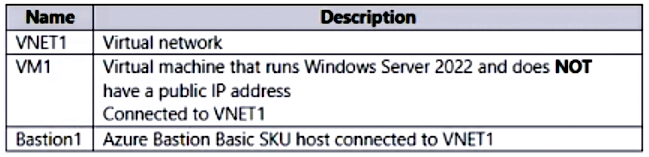
Device1 has Azure PowerShell and Azure Command-Line Interface (CLI) installed.
From Device1, you need to establish a Remote Desktop connection to VM1.
Which three actions should you perform in sequence? To answer, move the appropriate actions from the list of actions to the answer area and arrange them in the correct order.
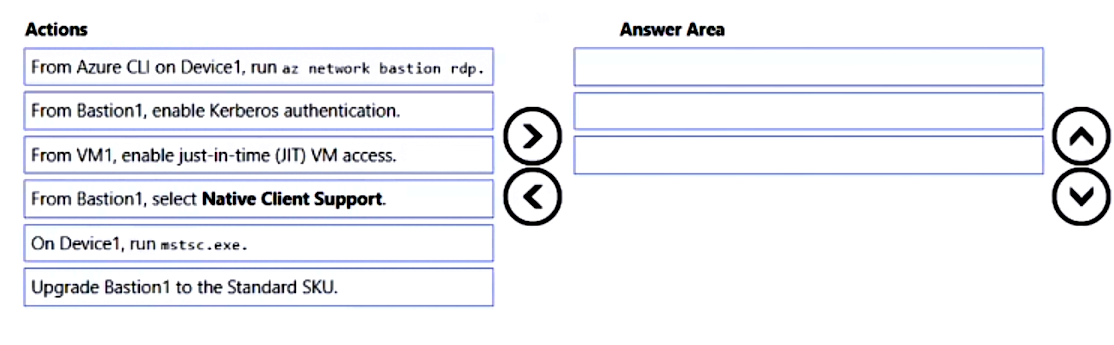
Correct Answer: 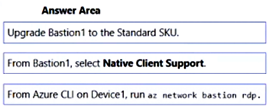
Question #121Topic 5
You have five Azure virtual machines that run Windows Server 2016. The virtual machines are configured as web servers.
You have an Azure load balancer named LB1 that provides load balancing services for the virtual machines.
You need to ensure that visitors are serviced by the same web server for each request.
What should you configure?
- A. Floating IP (direct server return) to Enabled
- B. Session persistence to Client IP
- C. Protocol to UDP
- D. Idle Time-out (minutes) to 20
Correct Answer: B
Question #122Topic 5
You have an Azure subscription that has the public IP addresses shown in the following table.
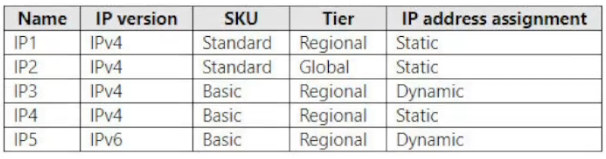
You plan to deploy an Azure Bastion Basic SKU host named Bastion1.
Which IP addresses can you use?
- A. IP1 only
- B. IP1 and IP2 only
- C. IP3, IP4, and IP5 only
- D. IP1, IP2, IP4, and IP5 only
- E. IP1, IP2, IP3, IP4, and IP5
Correct Answer: B
Community vote distribution
A (86%)
14%
Question #123Topic 5
You have five Azure virtual machines that run Windows Server 2016. The virtual machines are configured as web servers.
You have an Azure load balancer named LB1 that provides load balancing services for the virtual machines.
You need to ensure that visitors are serviced by the same web server for each request.
What should you configure?
- A. Floating IP (direct server return) to Disabled
- B. Floating IP (direct server return) to Enabled
- C. a health probe
- D. Session persistence to Client IP
Correct Answer: D
Question #124Topic 5
You have five Azure virtual machines that run Windows Server 2016. The virtual machines are configured as web servers.
You have an Azure load balancer named LB1 that provides load balancing services for the virtual machines.
You need to ensure that visitors are serviced by the same web server for each request.
What should you configure?
- A. Floating IP (direct server return) to Enabled
- B. Idle Time-out (minutes) to 20
- C. a health probe
- D. Session persistence to Client IP
Correct Answer: D
Community vote distribution
D (100%)
Question #125Topic 5
You have two Azure subscriptions named Sub1 and Sub2.
Sub1 contains a virtual machine named VM1 and a storage account named storage1.
VM1 is associated to the resources shown in the following table.
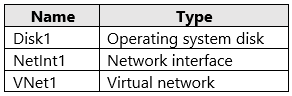
You need to move VM1 to Sub2.
Which resources should you move to Sub2?
- A. VM1, Disk1, and NetInt1 only
- B. VM1, Disk1, and VNet1 only
- C. VM1, Disk1, and storage1 only
- D. VM1, Disk1, NetInt1, and VNet1
Correct Answer: D
Community vote distribution
D (92%)
8%
Question #126Topic 5
You have five Azure virtual machines that run Windows Server 2016. The virtual machines are configured as web servers.
You have an Azure load balancer named LB1 that provides load balancing services for the virtual machines.
You need to ensure that visitors are serviced by the same web server for each request.
What should you configure?
- A. Session persistence to Client IP and protocol
- B. Idle Time-out (minutes) to 20
- C. Session persistence to None
- D. Floating IP (direct server return) to Enabled
Correct Answer: A
Question #127Topic 5
You have five Azure virtual machines that run Windows Server 2016. The virtual machines are configured as web servers.
You have an Azure load balancer named LB1 that provides load balancing services for the virtual machines.
You need to ensure that visitors are serviced by the same web server for each request.
What should you configure?
- A. Floating IP (direct server return) to Disabled
- B. Idle Time-out (minutes) to 20
- C. a health probe
- D. Session persistence to Client IP
Correct Answer: D
Question #128Topic 5
You have five Azure virtual machines that run Windows Server 2016. The virtual machines are configured as web servers.
You have an Azure load balancer named LB1 that provides load balancing services for the virtual machines.
You need to ensure that visitors are serviced by the same web server for each request.
What should you configure?
- A. Session persistence to Client IP
- B. Idle Time-out (minutes) to 20
- C. Session persistence to None
- D. Protocol to UDP
Correct Answer: A
Question #129Topic 5
You plan to deploy several Azure virtual machines that will run Windows Server 2019 in a virtual machine scale set by using an Azure Resource Manager template.
You need to ensure that NGINX is available on all the virtual machines after they are deployed.
What should you use?
- A. the Publish-AzVMDscConfiguration cmdlet
- B. a Microsoft Endpoint Manager device configuration profile
- C. Azure Application Insights
- D. a Desired State Configuration (DSC) extension
Correct Answer: D
Question #130Topic 5
You plan to deploy several Azure virtual machines that will run Windows Server 2019 in a virtual machine scale set by using an Azure Resource Manager template.
You need to ensure that NGINX is available on all the virtual machines after they are deployed.
What should you use?
- A. Azure Custom Script Extension
- B. Deployment Center in Azure App Service
- C. the New-AzConfigurationAssignment cmdlet
- D. a Microsoft Endpoint Manager device configuration profile
Correct Answer: A
Question #131Topic 5
You have an Azure subscription that contains a Recovery Services vault named Vault1.
You need to enable multi-user authorization (MAU) for Vault1.
Which resource should you create first?
- A. an administrative unit
- B. a managed identity
- C. a resource guard
- D. a custom Azure role
Correct Answer: C
Community vote distribution
C (100%)
Question #132Topic 5
Note: This question is part of a series of questions that present the same scenario. Each question in the series contains a unique solution that might meet the stated goals. Some question sets might have more than one correct solution, while others might not have a correct solution.
After you answer a question in this section, you will NOT be able to return to it. As a result, these questions will not appear in the review screen.
You have an app named App1 that is installed on two Azure virtual machines named VM1 and VM2. Connections to App1 are managed by using an Azure Load Balancer.
The effective network security configurations for VM2 are shown in the following exhibit.
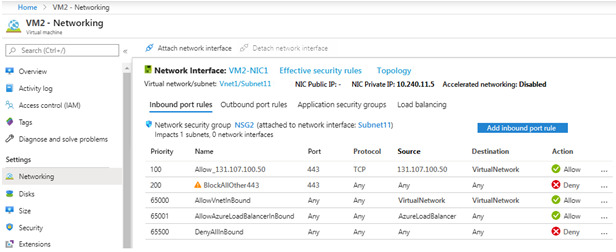
You discover that connections to App1 from 131.107.100.50 over TCP port 443 fail.
You verify that the Load Balancer rules are configured correctly.
You need to ensure that connections to App1 can be established successfully from 131.107.100.50 over TCP port 443.
Solution: You create an inbound security rule that allows any traffic from the AzureLoadBalancer source and has a priority of 150.
Does this meet the goal?
- A. Yes
- B. No
Correct Answer: A
Community vote distribution
A (65%)
B (35%)
Question #133Topic 5
Your on-premises network contains a VPN gateway.
You have an Azure subscription that contains the resources shown in the following table.
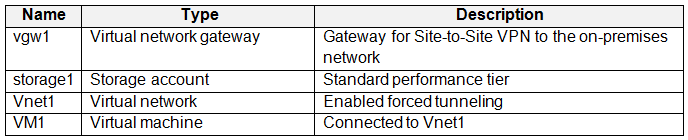
You need to ensure that all the traffic from VM1 to storage1 travels across the Microsoft backbone network.
What should you configure?
- A. Azure Application Gateway
- B. service endpoints
- C. Azure AD Application Proxy
- D. Azure Virtual WAN
Correct Answer: B
Community vote distribution
B (100%)
Question #134Topic 5
You create an Azure VM named VM1 that runs Windows Server 2019.
VM1 is configured as shown in the exhibit. (Click the Exhibit tab.)
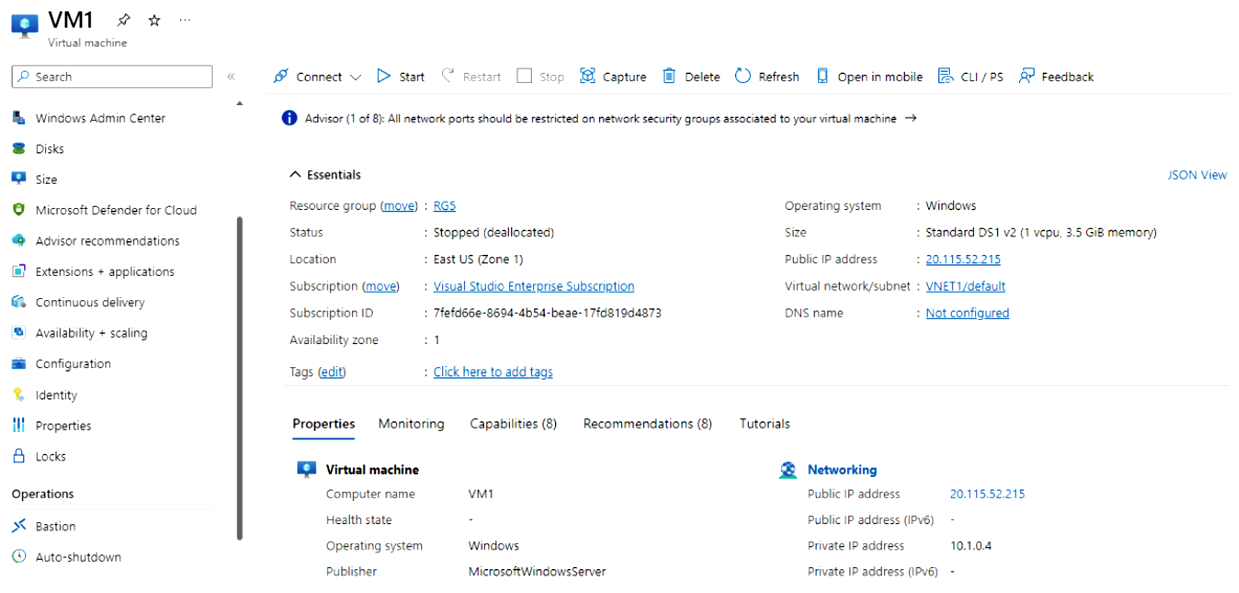
You need to enable Desired State Configuration for VM1.
What should you do first?
- A. Connect to VM1.
- B. Start VM1.
- C. Capture a snapshot of VM1.
- D. Configure a DNS name for VM1.
Correct Answer: B
Community vote distribution
B (100%)
Question #135Topic 5
HOTSPOT
–
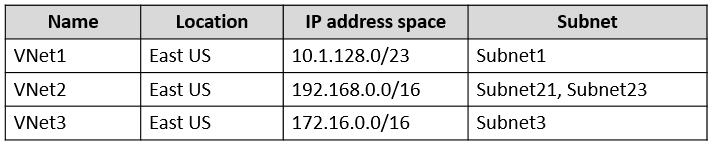
You have an Azure subscription that contains the virtual networks shown in the following table.
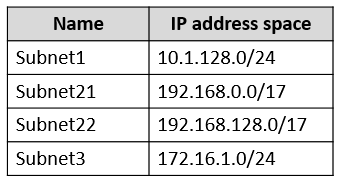
The subnets have the IP address spaces shown in the following table.
You plan to create a container app named contapp1 in the East US Azure region.
You need to create a container app environment named con-env1 that meets the following requirements:
• Uses its own virtual network.
• Uses its own subnet.
• Is connected to the smallest possible subnet.
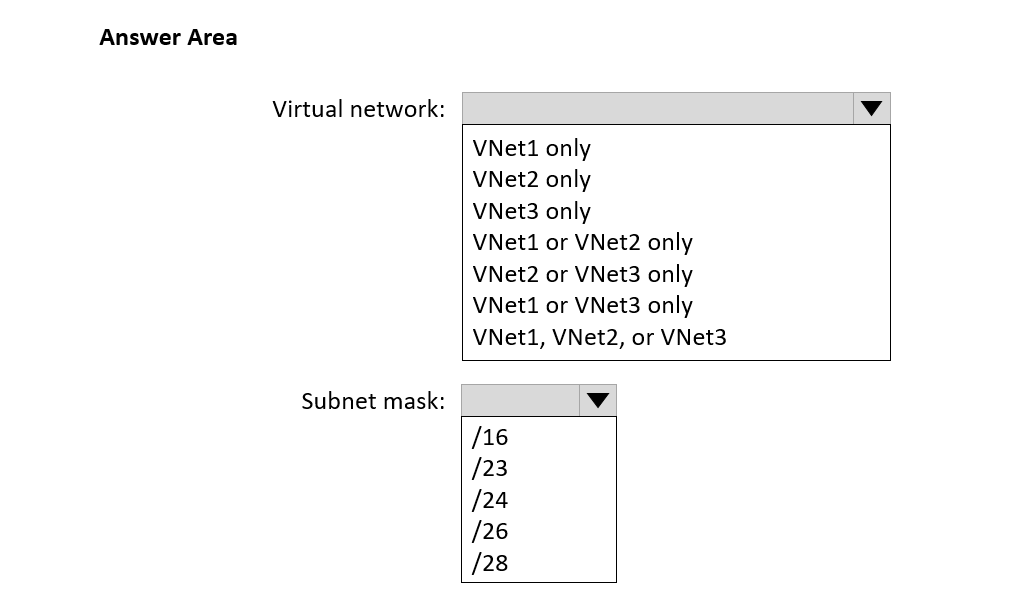
To which virtual networks can you connect con-env1, and which subnet mask should you use? To answer, select the appropriate options in the answer area.
NOTE: Each correct selection is worth one point.
Correct Answer: 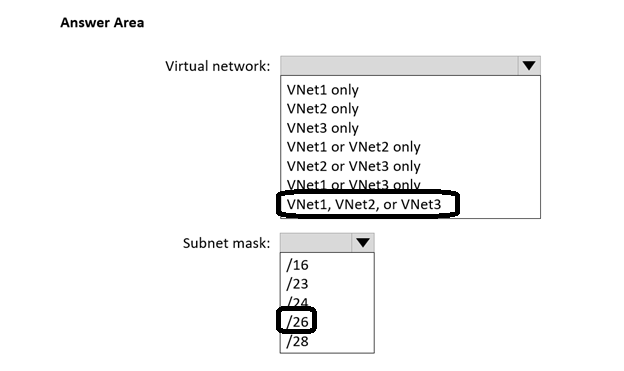
Question #136Topic 5
You have an Azure subscription that contains the virtual networks shown in the following table.
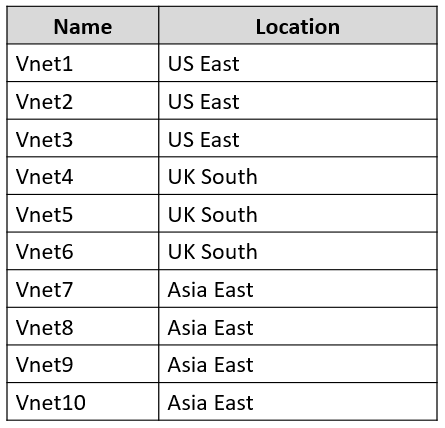
All the virtual networks are peered. Each virtual network contains nine virtual machines.
You need to configure secure RDP connections to the virtual machines by using Azure Bastion.
What is the minimum number of Bastion hosts required?
- A. 1
- B. 3
- C. 9
- D. 10
Correct Answer: B
Community vote distribution
A (88%)
13%
Question #137Topic 5
HOTSPOT
–
You have an Azure subscription that contains the virtual networks shown in the following table.
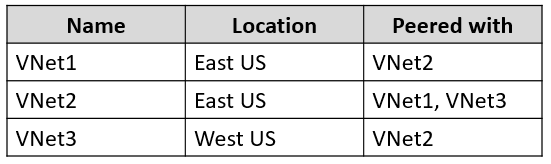
The subscription contains the virtual machines shown in the following table.
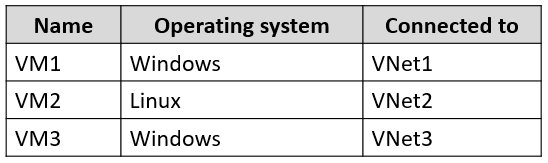
Each virtual machine contains only a private IP address.
You create an Azure bastion for VNet1 as shown in the following exhibit.
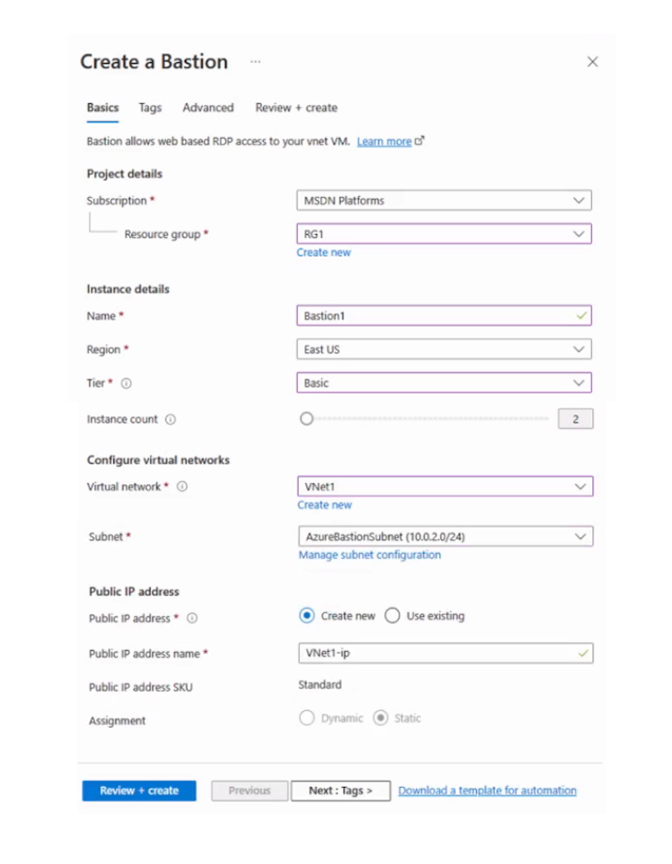
For each of the following statements, select Yes if the statement is true. Otherwise, select No.
NOTE: Each correct selection is worth one point.
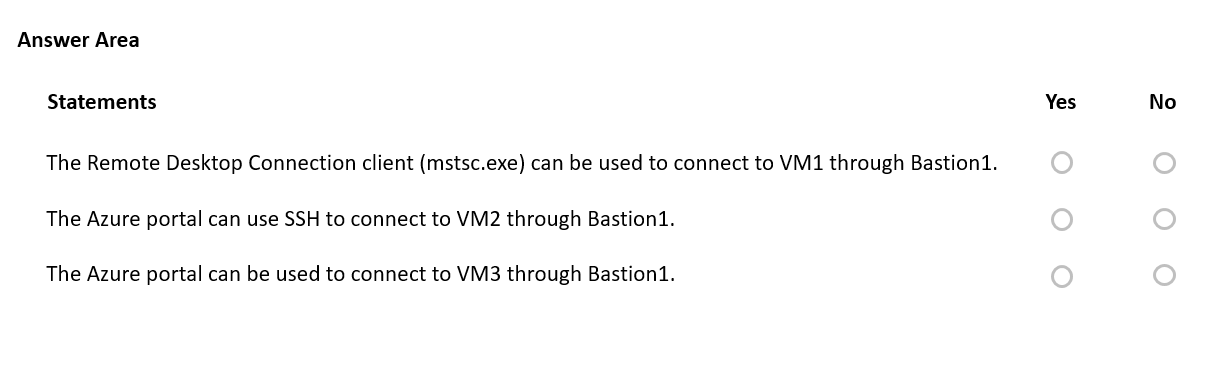
Correct Answer: 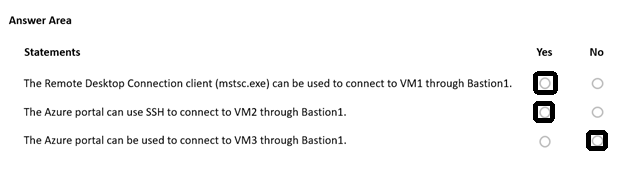
Question #138Topic 5
HOTSPOT
–
You have an Azure subscription that contains the virtual networks shown in the following table.
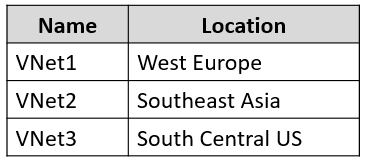
The subscription contains the subnets shown in the following table.
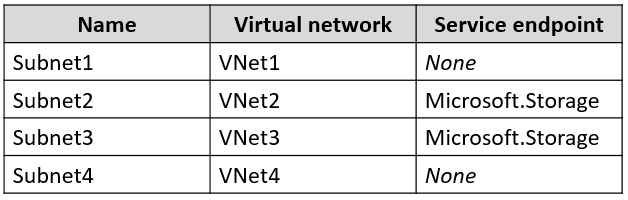
The subscription contains the storage accounts shown in the following table.
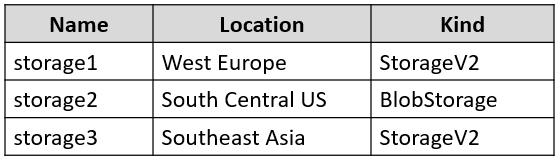
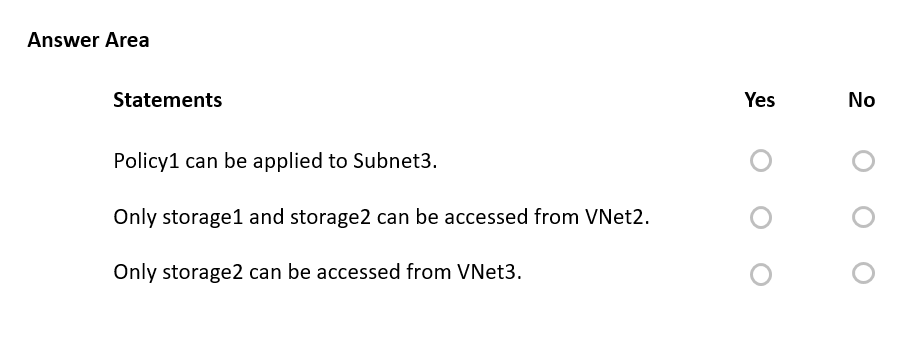
You create a service endpoint policy named Policy1 in the South Central US Azure region to allow connectivity to all the storage accounts in the subscription.
For each of the following statements, select Yes if the statement is true. Otherwise, select No.
NOTE: Each correct selection is worth one point.
Correct Answer: 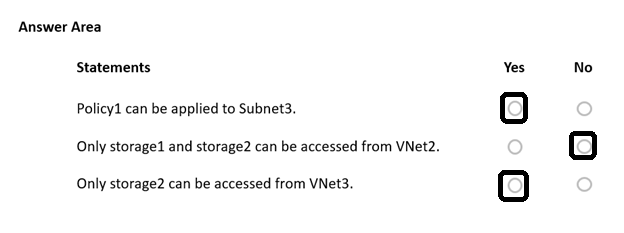
Question #139Topic 5
You plan to deploy several Azure virtual machines that will run Windows Server 2019 in a virtual machine scale set by using an Azure Resource Manager template.
You need to ensure that NGINX is available on all the virtual machines after they are deployed.
What should you use?
- A. the New-AzConfigurationAssignment cmdlet
- B. Azure Application Insights
- C. the Publish-AzVMDscConfiguration cmdlet
- D. a Desired State Configuration (DSC) extension
Correct Answer: D
Question #140Topic 5
You have an Azure subscription that contains a resource group named RG1 and a virtual network named VNet1.
You plan to create an Azure container instance named container1.
You need to be able to configure DNS name label scope reuse for container1.
What should you configure for container1?
- A. the private networking type
- B. the public networking type
- C. a new subnet on VNet1
- D. a confidential SKU
Correct Answer: B
Community vote distribution
B (100%)
Question #141Topic 5
HOTSPOT
–
You have the Azure virtual machines shown in the following table.
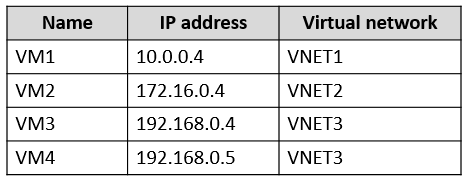
VNET1, VNET2, and VNET3 are peered.
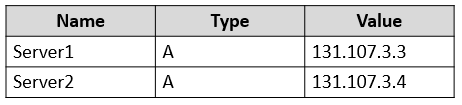
VM4 has a DNS server that is authoritative for a zone named contoso.com and contains the records shown in the following table.
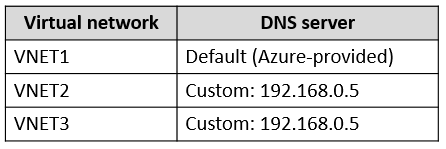
The virtual networks are configured to use the DNS servers shown in the following table.
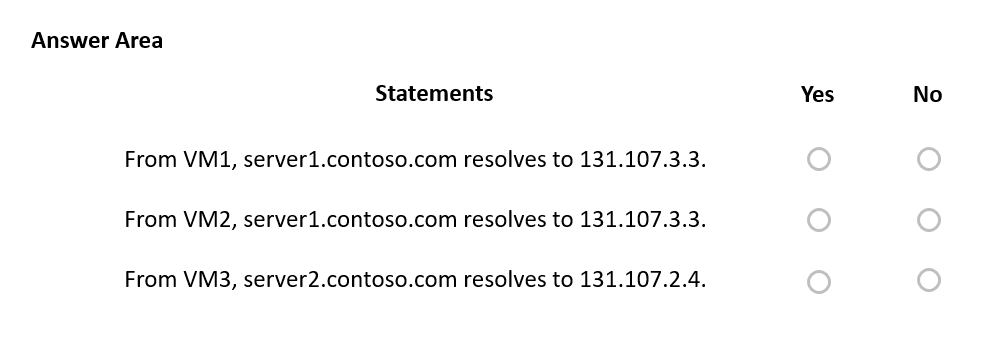
For each of the following statements, select Yes if the statement is true. Otherwise, select No.
NOTE: Each correct selection is worth one point.
Correct Answer: 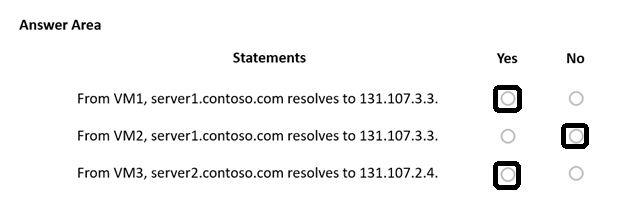
Question #142Topic 5
DRAG DROP
–
You have an Azure subscription that contains a resource group named RG1.
You plan to create an Azure Resource Manager (ARM) template to deploy a new virtual machine named VM1. VM1 must support the capture of performance data.
You need to specify resource dependencies for the ARM template.
In which order should you deploy the resources? To answer, move all resources from the list of resources to the answer area and arrange them in the correct order.
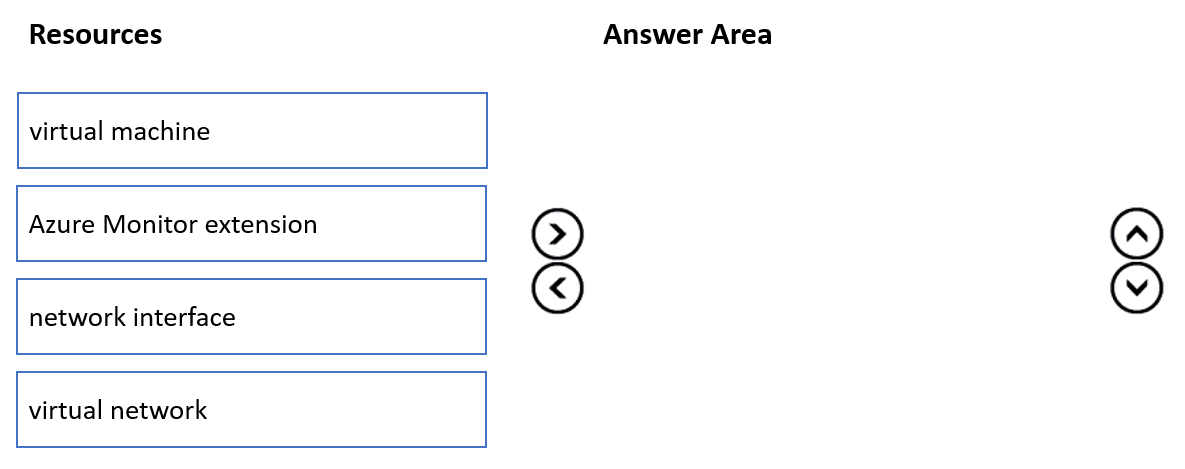
Correct Answer: 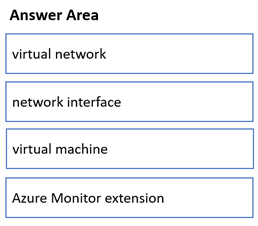
Question #143Topic 5
You plan to deploy several Azure virtual machines that will run Windows Server 2019 in a virtual machine scale set by using an Azure Resource Manager template.
You need to ensure that NGINX is available on all the virtual machines after they are deployed.
What should you use?
- A. a Desired State Configuration (DSC) extension
- B. a Microsoft Intune device configuration profile
- C. the Publish-AzVMDscConfiguration cmdlet
- D. the New-AzConfigurationAssignment cmdlet
Correct Answer: A
Community vote distribution
A (100%)
Question #144Topic 5
You have an Azure subscription that contains the virtual networks shown in the following table.
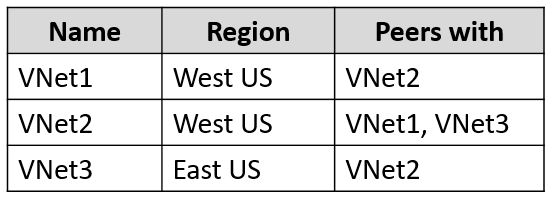
The subscription contains the virtual machines shown in the following table.
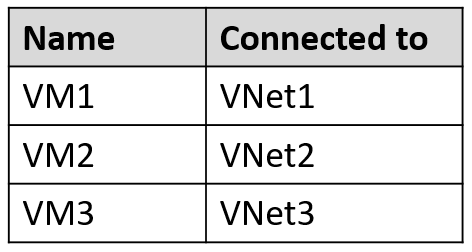
All the virtual machines have only private IP addresses.
You deploy an Azure Bastion host named Bastion1 to VNet1.
To which virtual machines can you connect through Bastion1?
- A. VM1 only
- B. VM1 and VM2 only
- C. VM1 and VM3 only
- D. VM1, VM2, and VM3
Correct Answer: B
Community vote distribution
B (56%)
D (44%)
Question #145Topic 5
You plan to deploy several Azure virtual machines that will run Windows Server 2019 in a virtual machine scale set by using an Azure Resource Manager template.
You need to ensure that NGINX is available on all the virtual machines after they are deployed.
What should you use?
- A. a Microsoft Intune device configuration profile
- B. a Desired State Configuration (DSC) extension
- C. Azure Application Insights
- D. Deployment Center in Azure App Service
Correct Answer: D
Community vote distribution
B (100%)
Topic 6 – Question Set 6
Question #1Topic 6
You have an Azure subscription that has a Recovery Services vault named Vault1. The subscription contains the virtual machines shown in the following table:
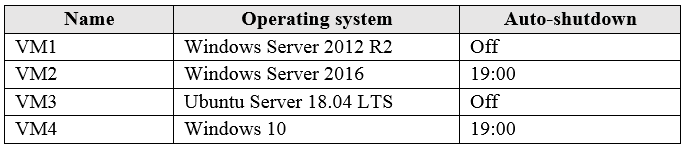
You plan to schedule backups to occur every night at 23:00.
Which virtual machines can you back up by using Azure Backup?
- A. VM1 and VM3 only
- B. VM1, VM2, VM3 and VM4
- C. VM1 and VM2 only
- D. VM1 only
Correct Answer: B
Azure Backup supports backup of 64-bit Windows server operating system from Windows Server 2008.
Azure Backup supports backup of 64-bit Windows 10 operating system.
Azure Backup supports backup of 64-bit Ubuntu Server operating system from Ubuntu 12.04.
Azure Backup supports backup of VM that are shutdown or offline.
Reference:
https://docs.microsoft.com/en-us/azure/backup/backup-support-matrix-iaas https://docs.microsoft.com/en-us/azure/virtual-machines/linux/endorsed-distros
Community vote distribution
B (100%)
Question #2Topic 6
HOTSPOT –
You create a Recovery Services vault backup policy named Policy1 as shown in the following exhibit:
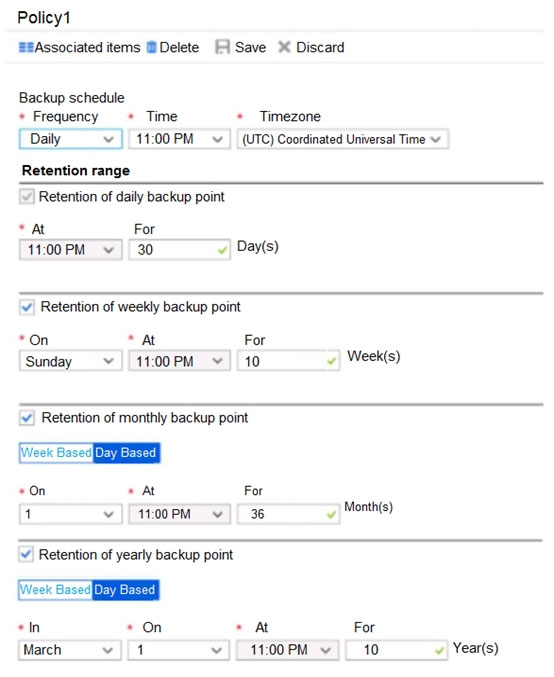
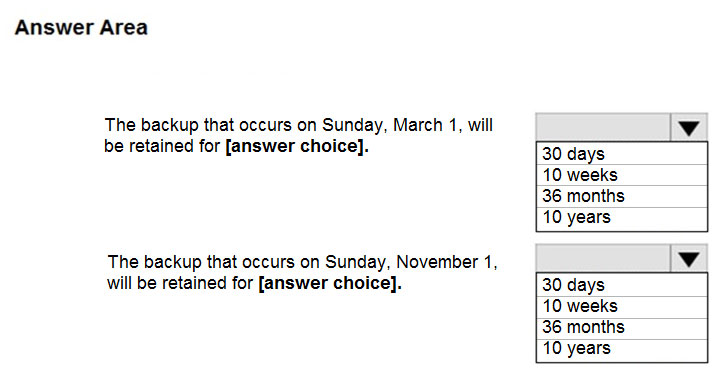
Use the drop-down menus to select the answer choice that completes each statement based on the information presented in the graphic.
NOTE: Each correct selection is worth one point.
Hot Area:
Correct Answer: 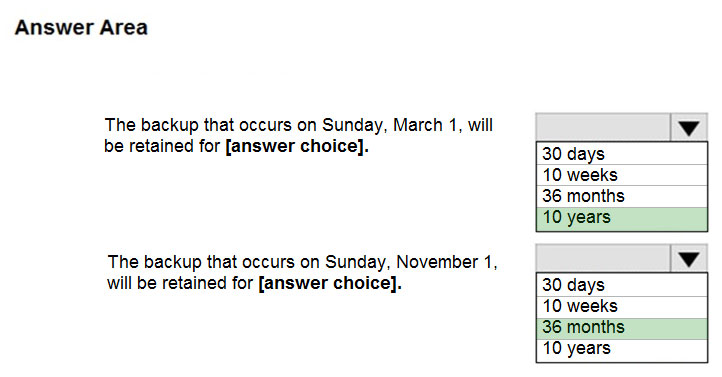
Box 1: 10 years –
The yearly backup point occurs to 1 March and its retention period is 10 years.
Box 2: 36 months –
The monthly backup point occurs on the 1
of every month and its retention period is 36 months.
st
Question #3Topic 6
You have the Azure virtual machines shown in the following table:
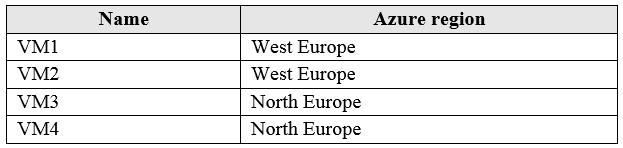
You have a Recovery Services vault that protects VM1 and VM2.
You need to protect VM3 and VM4 by using Recovery Services.
What should you do first?
- A. Create a new Recovery Services vault
- B. Create a storage account
- C. Configure the extensions for VM3 and VM4
- D. Create a new backup policy
Correct Answer: A
A Recovery Services vault is a storage entity in Azure that houses data. The data is typically copies of data, or configuration information for virtual machines
(VMs), workloads, servers, or workstations. You can use Recovery Services vaults to hold backup data for various Azure services
Reference:
https://docs.microsoft.com/en-us/azure/site-recovery/azure-to-azure-tutorial-enable-replicatio
Community vote distribution
A (100%)
Question #4Topic 6
HOTSPOT –
You have an Azure subscription that contains an Azure Storage account named storage1 and the users shown in the following table.
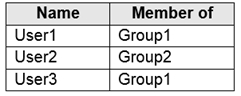
You plan to monitor storage1 and to configure email notifications for the signals shown in the following table.

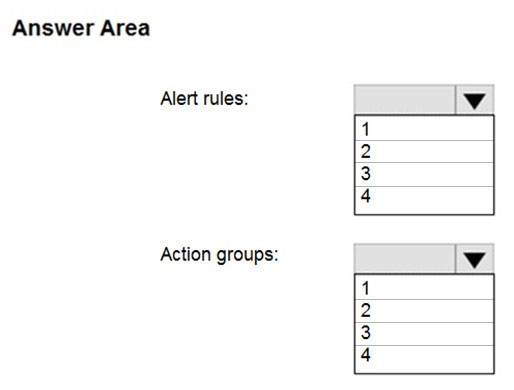
You need to identify the minimum number of alert rules and action groups required for the planned monitoring.
How many alert rules and action groups should you identify? To answer, select the appropriate options in the answer area.
NOTE: Each correct selection is worth one point.
Hot Area:
Correct Answer: 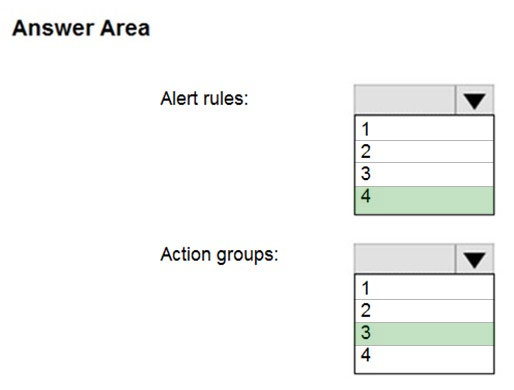
Question #5Topic 6
You have an Azure subscription that contains the identities shown in the following table.
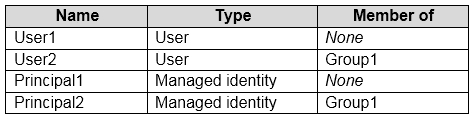
User1, Principal1, and Group1 are assigned the Monitoring Reader role.
An action group named AG1 has the Email Azure Resource Manager Role notification type and is configured to email the Monitoring Reader role.
You create an alert rule named Alert1 that uses AG1.
You need to identity who will receive an email notification when Alert1 is triggered.
Who should you identify?
- A. User1 and Principal1 only
- B. User1, User2, Principal1, and Principal2
- C. User1 only
- D. User1 and User2 only
Correct Answer: C
Email will only be sent to Azure AD user members of the Monitoring Reader role. Email will not be sent to Azure AD groups or service principals.
Reference:
https://docs.microsoft.com/en-us/azure/azure-monitor/platform/action-groups
Community vote distribution
D (59%)
C (41%)
Question #6Topic 6
HOTSPOT –
You have an Azure virtual machine named VM1 and a Recovery Services vault named Vault1.
You create a backup policy named Policy1 as shown in the exhibit. (Click the Exhibit tab.)
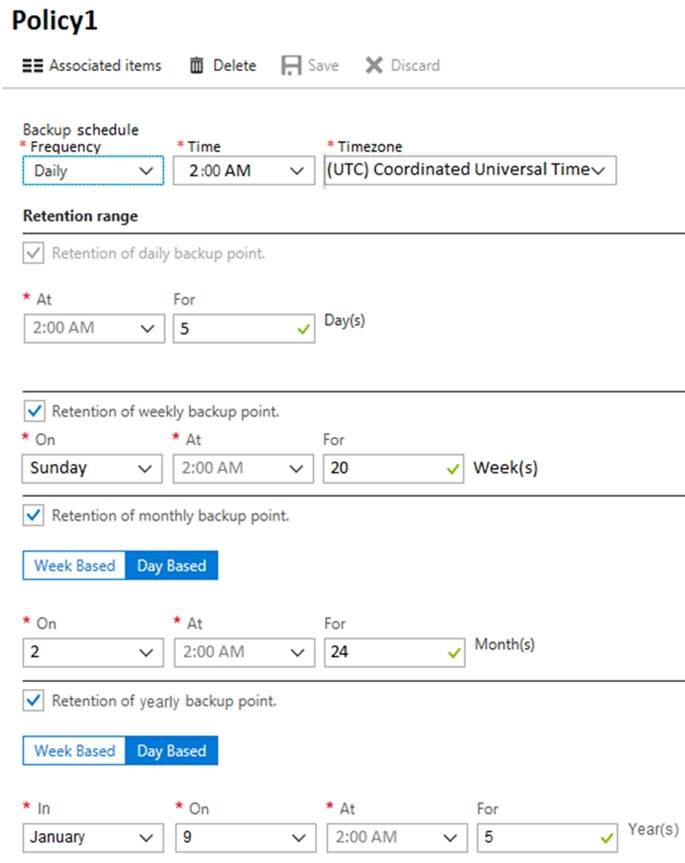
You configure the backup of VM1 to use Policy1 on Thursday, January 1 at 1:00 AM.
You need to identify the number of available recovery points for VM1.
How many recovery points are available on January 8 and January 15? To answer, select the appropriate options in the answer area.
NOTE: Each correct selection is worth one point.
Hot Area:
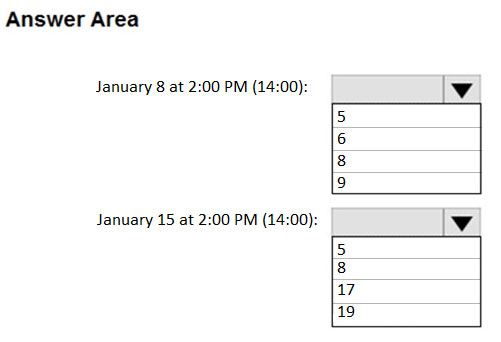
Correct Answer: 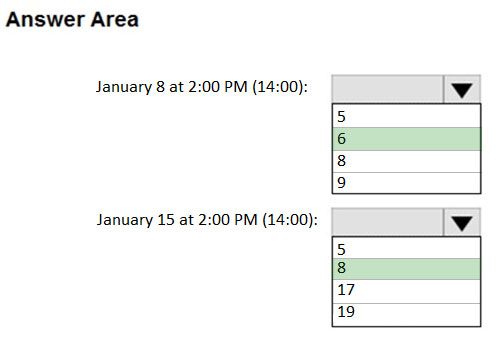
Box 1: 6 –
5 latest daily recovery points, which includes the weekly backup from the previous Sunday, plus the monthly recovery point.
Box 2: 8 –
5 latest daily recovery points, plus two weekly backups, plus the monthly recovery point.
Reference:
https://social.technet.microsoft.com/Forums/en-US/854ab6ae-79aa-4bad-ac65-471c4d422e94/daily-monthly-yearly-recovery-points-and-storage-used? forum=windowsazureonlinebackup
Question #7Topic 6
HOTSPOT –
You have the web apps shown in the following table.
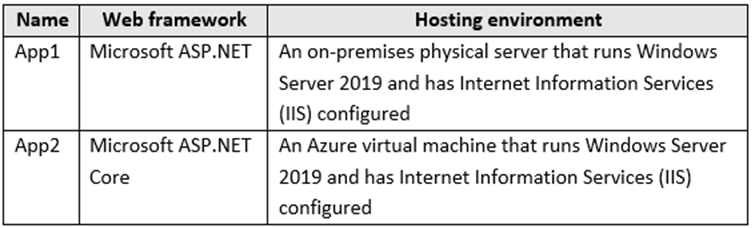
You need to monitor the performance and usage of the apps by using Azure Application Insights. The solution must minimize modifications to the application code.
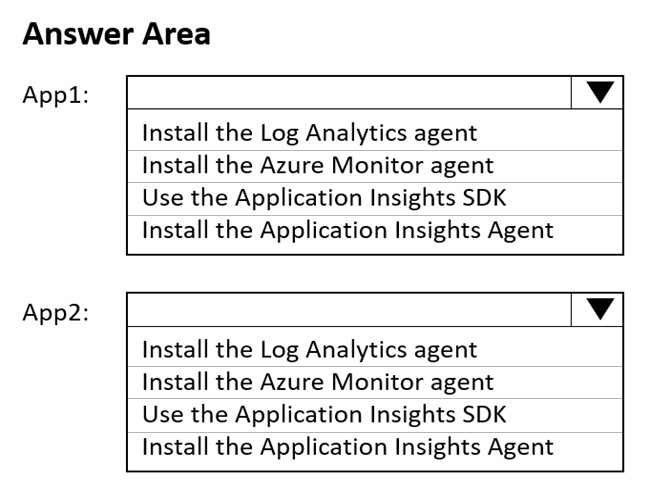
What should you do on each app? To answer, select the appropriate options in the answer area.
NOTE: Each correct selection is worth one point.
Hot Area:
Correct Answer: 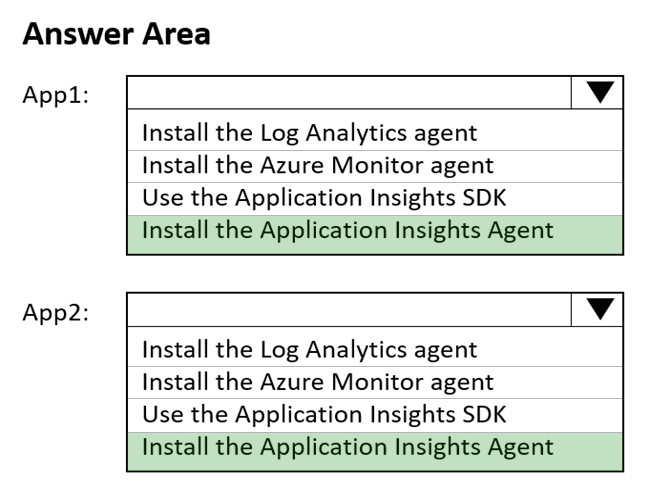
Reference:
https://docs.microsoft.com/en-us/azure/azure-monitor/app/azure-web-apps
Question #8Topic 6
You have an Azure virtual machine named VM1.
You use Azure Backup to create a backup of VM1 named Backup1.
After creating Backup1, you perform the following changes to VM1:
✑ Modify the size of VM1.
✑ Copy a file named Budget.xls to a folder named Data.
✑ Reset the password for the built-in administrator account.
✑ Add a data disk to VM1.
An administrator uses the Replace existing option to restore VM1 from Backup1.
You need to ensure that all the changes to VM1 are restored.
Which change should you perform again?
- A. Modify the size of VM1.
- B. Reset the password for the built-in administrator account.
- C. Add a data disk.
- D. Copy Budget.xls to Data.
Correct Answer: D
Reference:
https://docs.microsoft.com/en-us/azure/backup/about-azure-vm-restore
Community vote distribution
D (78%)
C (22%)
Question #9Topic 6
HOTSPOT –
You have an Azure Active Directory (Azure AD) tenant named contoso.onmicrosoft.com that contains the users shown in the following table.

You enable password reset for contoso.onmicrosoft.com as shown in the Password Reset exhibit. (Click the Password Reset tab.)
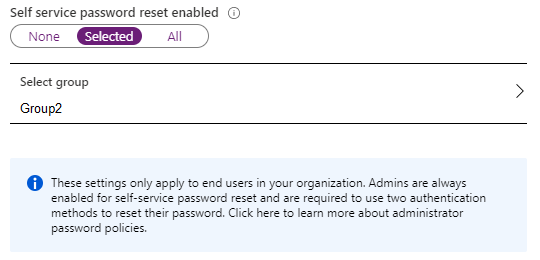
You configure the authentication methods for password reset as shown in the Authentication Methods exhibit. (Click the Authentication Methods tab.)
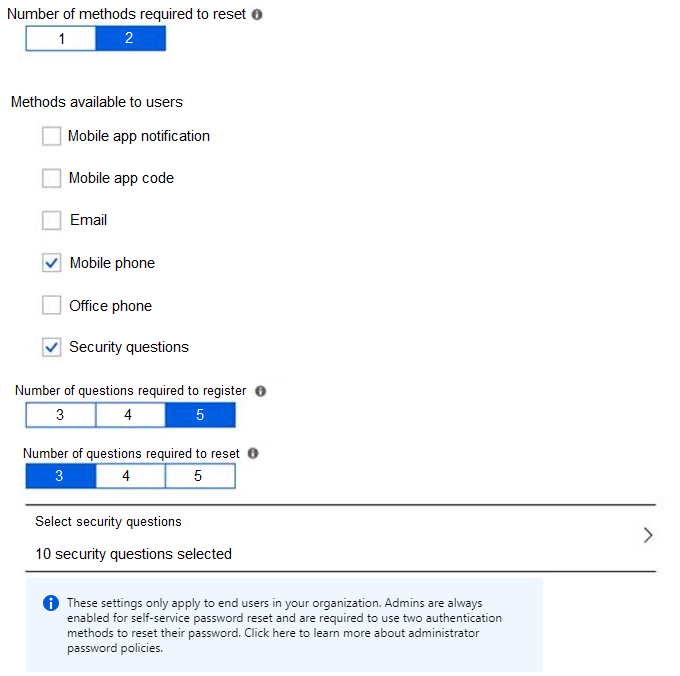
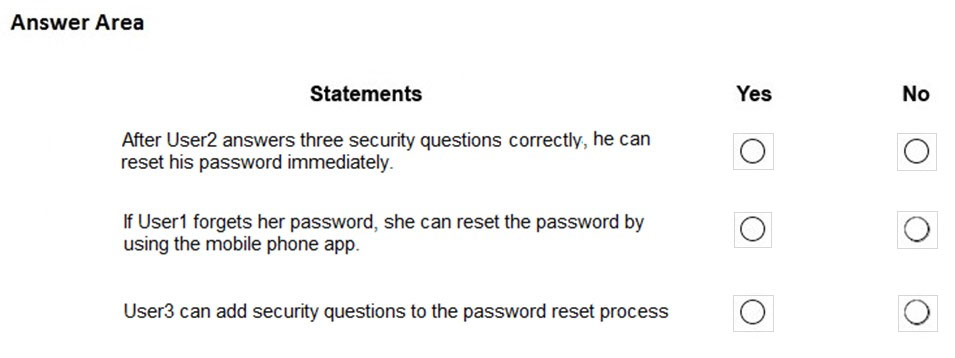
For each of the following statements, select Yes if the statement is true. Otherwise, select No.
NOTE: Each correct selection is worth one point.
Hot Area:
Correct Answer: 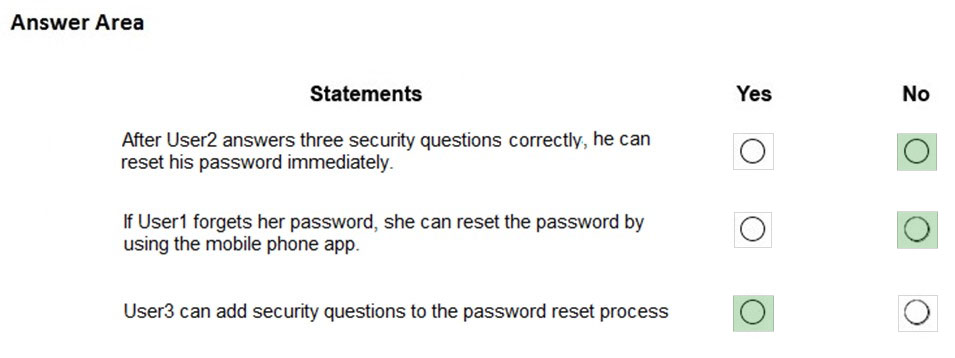
Box 1: No –
Two methods are required.
Box 2: No –
Self-service password reset is only enabled for Group2, and User1 is not a member of Group2.
Box 3: Yes –
As a User Administrator, User3 can add security questions to the reset process.
Reference:
https://docs.microsoft.com/en-us/azure/active-directory/authentication/quickstart-sspr https://docs.microsoft.com/en-us/azure/active-directory/authentication/active-directory-passwords-faq
Question #10Topic 6
Your company has a main office in London that contains 100 client computers.
Three years ago, you migrated to Azure Active Directory (Azure AD).
The company’s security policy states that all personal devices and corporate-owned devices must be registered or joined to Azure AD.
A remote user named User1 is unable to join a personal device to Azure AD from a home network.
You verify that User1 was able to join devices to Azure AD in the past.
You need to ensure that User1 can join the device to Azure AD.
What should you do?
- A. Assign the User administrator role to User1.
- B. From the Device settings blade, modify the Maximum number of devices per user setting.
- C. Create a point-to-site VPN from the home network of User1 to Azure.
- D. From the Device settings blade, modify the Users may join devices to Azure AD setting.
Correct Answer: B
The Maximum number of devices setting enables you to select the maximum number of devices that a user can have in Azure AD. If a user reaches this quota, they will not be able to add additional devices until one or more of the existing devices are removed.
Incorrect Answers:
C: Azure AD Join enables users to join their devices to Active Directory from anywhere as long as they have connectivity with the Internet.
D: The Users may join devices to Azure AD setting enables you to select the users who can join devices to Azure AD. Options are All, Selected and None. The default is All.
Reference:
https://docs.microsoft.com/en-us/azure/active-directory/devices/device-management-azure-portal http://techgenix.com/pros-and-cons-azure-ad-join/
Community vote distribution
B (92%)
8%
Question #11Topic 6
HOTSPOT –
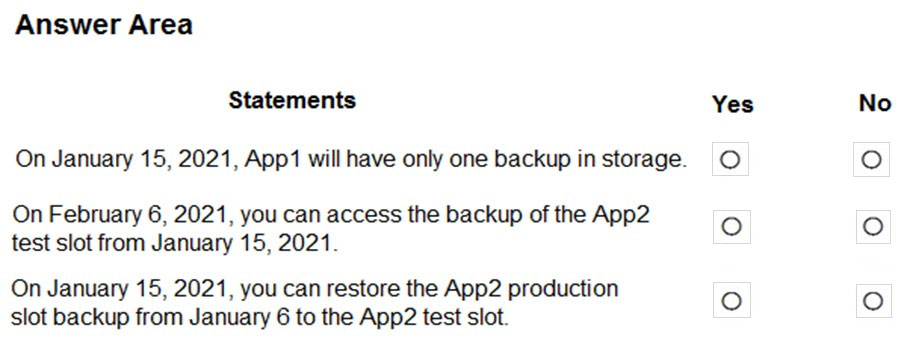
You have two Azure App Service app named App1 and App2. Each app has a production deployment slot and a test deployment slot.
The Backup Configuration settings for the production slots are shown in the following table.

For each of the following statements, select Yes if the statement is true. Otherwise, select No.
NOTE: Each correct selection is worth one point.
Hot Area:
Correct Answer: 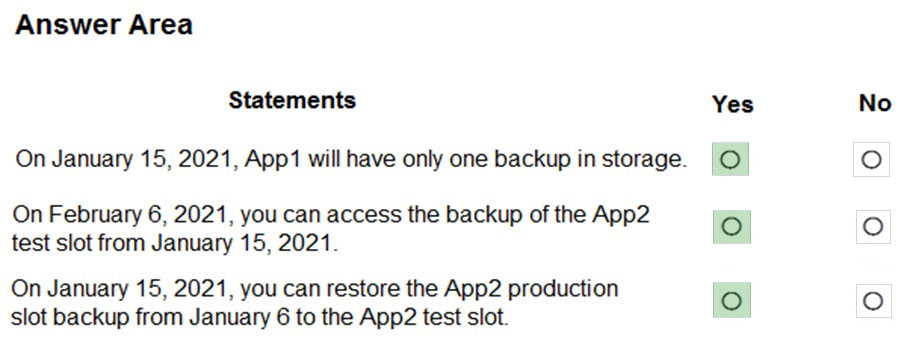
Question #12Topic 6
HOTSPOT –
You have an Azure subscription that contains an Azure Active Directory (Azure AD) tenant named contoso.com. The tenant is synced to the on-premises Active
Directory domain. The domain contains the users shown in the following table.
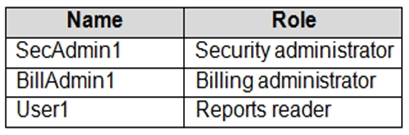
You enable self-service password reset (SSPR) for all users and configure SSPR to have the following authentication methods:
✑ Number of methods required to reset: 2
✑ Methods available to users: Mobile phone, Security questions
✑ Number of questions required to register: 3
✑ Number of questions required to reset: 3
You select the following security questions:
✑ What is your favorite food?
✑ In what city was your first job?
✑ What was the name of your first pet?
For each of the following statements, select Yes if the statement is true. Otherwise, select No.
NOTE: Each correct selection is worth one point.
Hot Area:
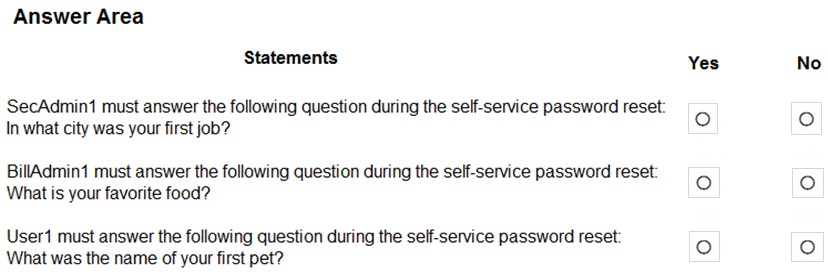
Correct Answer: 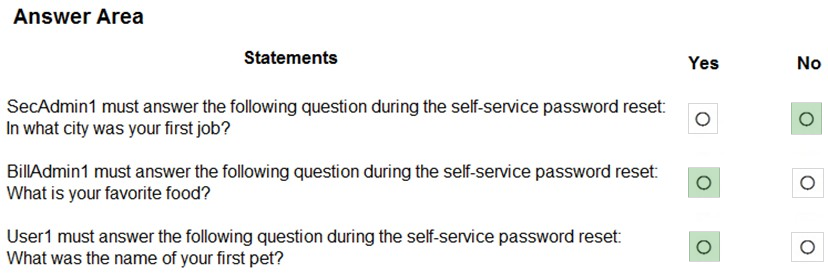
Box 1: No –
Administrator accounts are special accounts with elevated permissions. To secure them, the following restrictions apply to changing passwords of administrators:
On-premises enterprise administrators or domain administrators cannot reset their password through Self-service password reset (SSPR). They can only change their password in their on-premises environment. Thus, we recommend not syncing on-prem AD admin accounts to Azure AD. An administrator cannot use secret
Questions & Answers as a method to reset password.
Box 2: Yes –
Self-service password reset (SSPR) is an Azure Active Directory feature that enables employees to reset their passwords without needing to contact IT staff.
Box 3: Yes –
Reference:
https://docs.microsoft.com/en-us/azure/active-directory/authentication/howto-sspr-deployment
Question #13Topic 6
Note: This question is part of a series of questions that present the same scenario. Each question in the series contains a unique solution that might meet the stated goals. Some question sets might have more than one correct solution, while others might not have a correct solution.
After you answer a question in this section, you will NOT be able to return to it. As a result, these questions will not appear in the review screen.
You have an Azure subscription that contains the following users in an Azure Active Directory tenant named contoso.onmicrosoft.com:
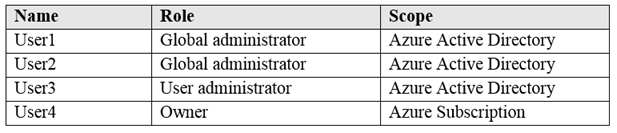
User1 creates a new Azure Active Directory tenant named external.contoso.onmicrosoft.com.
You need to create new user accounts in external.contoso.onmicrosoft.com.
Solution: You instruct User1 to create the user accounts.
Does that meet the goal?
- A. Yes
- B. No
Correct Answer: A
Only a global administrator can add users to this tenant.
Reference:
https://docs.microsoft.com/en-us/azure/devops/organizations/accounts/add-users-to-azure-ad
Community vote distribution
A (85%)
B (15%)
Question #14Topic 6
You have an existing Azure subscription that contains 10 virtual machines.
You need to monitor the latency between your on-premises network and the virtual machines.
What should you use?
- A. Service Map
- B. Connection troubleshoot
- C. Network Performance Monitor
- D. Effective routes
Correct Answer: C
Network Performance Monitor is a cloud-based hybrid network monitoring solution that helps you monitor network performance between various points in your network infrastructure. It also helps you monitor network connectivity to service and application endpoints and monitor the performance of Azure ExpressRoute.
You can monitor network connectivity across cloud deployments and on-premises locations, multiple data centers, and branch offices and mission-critical multitier applications or microservices. With Performance Monitor, you can detect network issues before users complain.
Reference:
https://docs.microsoft.com/en-us/azure/azure-monitor/insights/network-performance-monitor
Community vote distribution
C (100%)
Question #15Topic 6
HOTSPOT –
You have an Azure App Service plan named ASP1.
CPU usage for ASP1 is shown in the following exhibit.
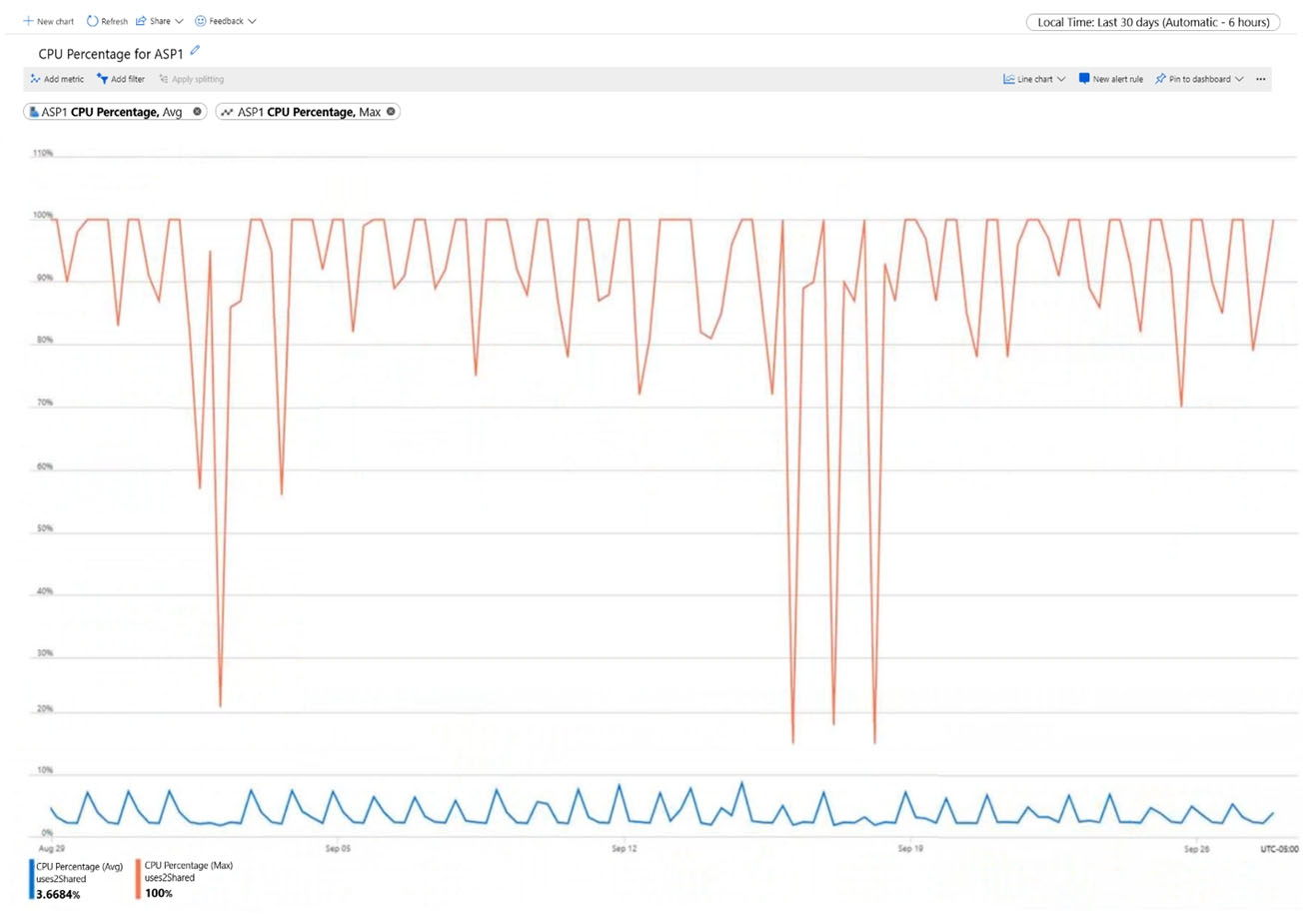
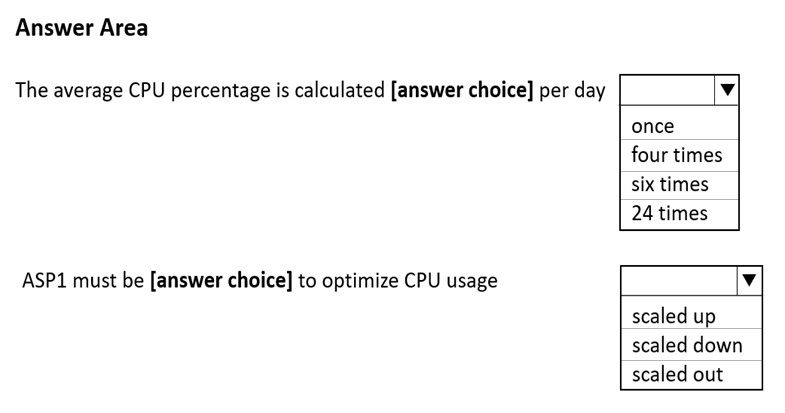
Use the drop-down menus to select the answer choice that completes each statement based on the information presented in the graphic.
NOTE: Each correct selection is worth one point.
Hot Area:
Correct Answer: 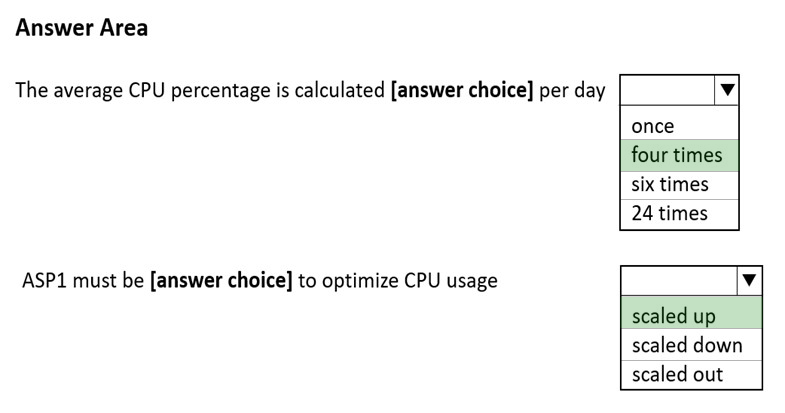
Box 1: four times –
From the exhibit we see that the time granularity is 6 hours: Last 30 days (Automatic – 6 hours).
CPU Percentage Last days Automatic – hours
Box 2: scaled up –
Scale up when:
* You see that your workloads are hitting some performance limit such as CPU or I/O limits.
* You need to quickly react to fix performance issues that can’t be solved with classic database optimization.
* You need a solution that allows you to change service tiers to adapt to changing latency requirements.
Reference:
https://docs.microsoft.com/en-us/azure/azure-monitor/essentials/metrics-troubleshoot https://azure.microsoft.com/en-us/overview/scaling-out-vs-scaling-up
Question #16Topic 6
DRAG DROP –
You have an Azure Linux virtual machine that is protected by Azure Backup.
One week ago, two files were deleted from the virtual machine.
You need to restore the deleted files to an on-premises Windows Server 2016 computer as quickly as possible.
Which four actions should you perform in sequence? To answer, move the appropriate actions from the list of actions to the answer area and arrange them in the correct order.
Select and Place:
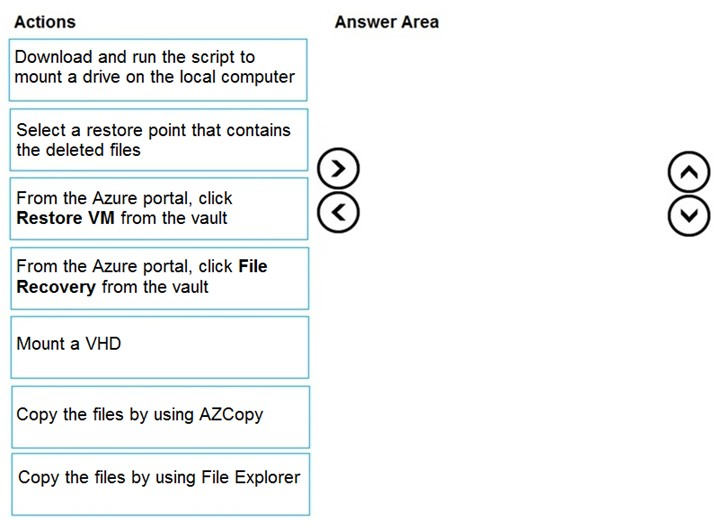
Correct Answer: 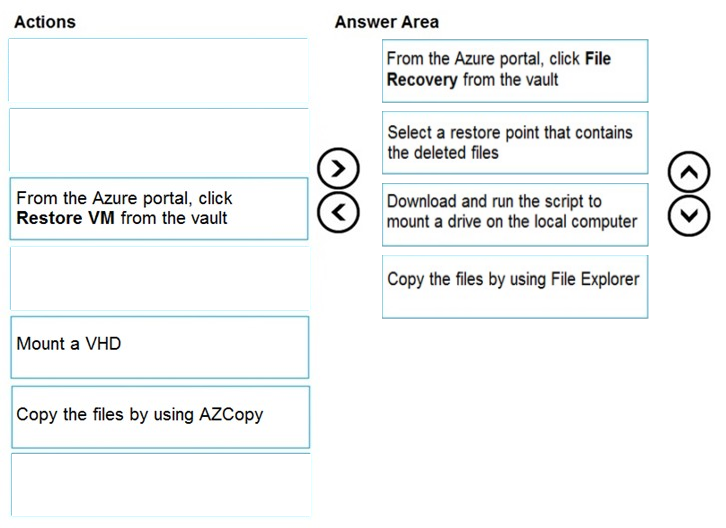
Step 1: From the Azure portal, click File Recovery from the vault
Step 2. Select a restore point that contains the deleted files
Step 3: Download and run the script to mount a drive on the local computer
Generate and download script to browse and recover files:
Step 4: Copy the files using File Explorer!
After the disks are attached, use Windows File Explorer to browse the new volumes and files. The restore files functionality provides access to all files in a recovery point. Manage the files via File Explorer as you would for normal files.
Step 1-3 below:
To restore files or folders from the recovery point, go to the virtual machine and perform the following steps:
1. Sign in to the Azure portal and in the left pane, select Virtual machines. From the list of virtual machines, select the virtual machine to open that virtual machine’s dashboard.
2. In the virtual machine’s menu, select Backup to open the Backup dashboard.
3. In the Backup dashboard menu, select File Recovery.
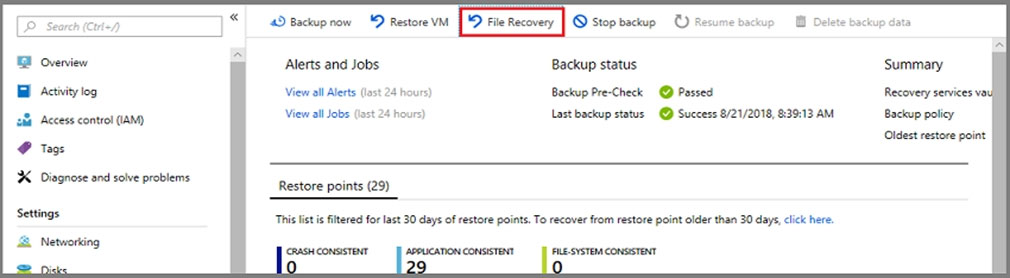
The File Recovery menu opens.
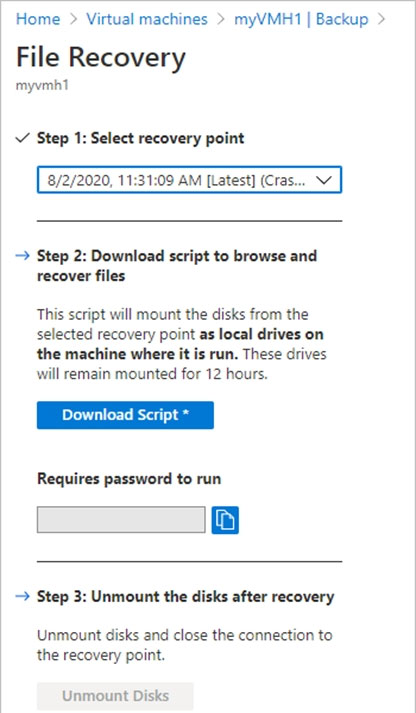
4. From the Select recovery point drop-down menu, select the recovery point that holds the files you want. By default, the latest recovery point is already selected.
5. Select Download Executable (for Windows Azure VMs) or Download Script (for Linux Azure VMs, a python script is generated) to download the software used to copy files from the recovery point.
Running the script and identifying volumes:
For Linux machines, a python script is generated. Download the script and copy it to the relevant/compatible Linux server.
Reference:
https://docs.microsoft.com/en-us/azure/backup/backup-azure-restore-files-from-vm https://docs.microsoft.com/en-us/azure/backup/backup-azure-vms-automation#restore-files-from-an-azure-vm-backup
Question #17Topic 6
HOTSPOT –
You purchase a new Azure subscription named Subscription1.
You create a virtual machine named VM1 in Subscription1. VM1 is not protected by Azure Backup.
You need to protect VM1 by using Azure Backup. Backups must be created at 01:00 and stored for 30 days.
What should you do? To answer, select the appropriate options in the answer area.
NOTE: Each correct selection is worth one point.
Hot Area:
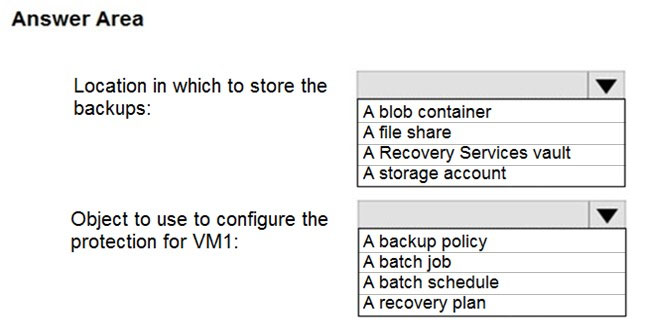
Correct Answer: 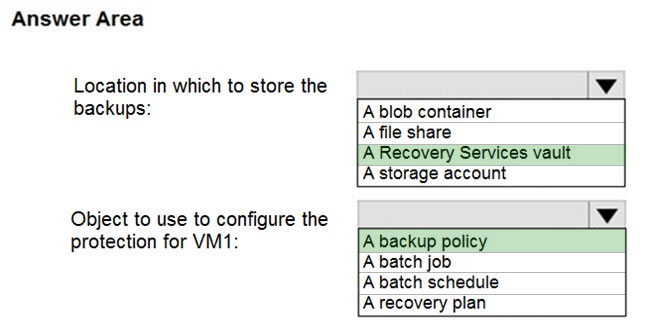
Box 1: A Recovery Services vault
You can set up a Recovery Services vault and configure backup for multiple Azure VMs.
Box 2: A backup policy –
In Choose backup policy, do one of the following:
✑ Leave the default policy. This backs up the VM once a day at the time specified, and retains backups in the vault for 30 days.
✑ Select an existing backup policy if you have one.
✑ Create a new policy, and define the policy settings.
Reference:
https://docs.microsoft.com/en-us/azure/backup/backup-azure-vms-first-look-arm
Question #18Topic 6
You have an Azure virtual machine named VM1.
Azure collects events from VM1.
You are creating an alert rule in Azure Monitor to notify an administrator when an error is logged in the System event log of VM1.
Which target resource should you monitor in the alert rule?
- A. virtual machine extension
- B. virtual machine
- C. metric alert
- D. Azure Log Analytics workspace
Correct Answer: D
For the first step to create the new alert tule, under the Create Alert section, you are going to select your Log Analytics workspace as the resource, since this is a log based alert signal.
Reference:
https://docs.microsoft.com/en-us/windows-server/storage/storage-spaces/configure-azure-monitor
Community vote distribution
D (90%)
10%
Question #19Topic 6
You have an Azure subscription that contains 100 virtual machines.
You regularly create and delete virtual machines.
You need to identify unattached disks that can be deleted.
What should you do?
- A. From Azure Cost Management, view Cost Analysis
- B. From Azure Advisor, modify the Advisor configuration
- C. From Microsoft Azure Storage Explorer, view the Account Management properties
- D. From Azure Cost Management, view Advisor Recommendations
Correct Answer: D
From Home ג€”> Cost Management + Billing ג€”> Cost Management, scroll down on the options and select View Recommendations:
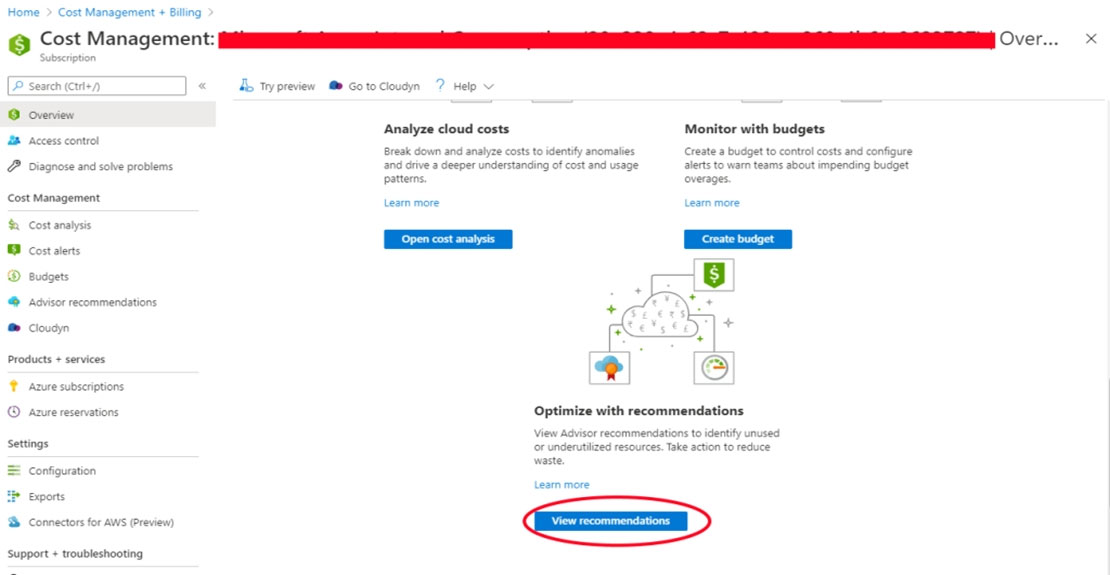
Azure Cost Management / Advisor –
From here you will see the recommendations for your subscription, if you have orphaned disks, they will be listed.
Reference:
Microsoft Azure: find unattached disks that can be deleted and other recommendations
Community vote distribution
D (82%)
C (18%)
Question #20Topic 6
You have an Azure web app named webapp1.
Users report that they often experience HTTP 500 errors when they connect to webapp1.
You need to provide the developers of webapp1 with real-time access to the connection errors. The solution must provide all the connection error details.
What should you do first?
- A. From webapp1, enable Web server logging
- B. From Azure Monitor, create a workbook
- C. From Azure Monitor, create a Service Health alert
- D. From webapp1, turn on Application Logging
Correct Answer: A
Community vote distribution
A (100%)
Question #21Topic 6
You have an Azure web app named App1.
You need to monitor the availability of App1 by using a multi-step web test.
What should you use in Azure Monitor?
- A. Azure Service Health
- B. Azure Application Insights
- C. the Diagnostic settings
- D. metrics
Correct Answer: B
Upload the web test –
1. In the Application Insights portal on the Availability pane select Add Classic test, then select Multi-step as the SKU.
2. Upload your multi-step web test.
3. Set the test locations, frequency, and alert parameters.
4. Select Create.
Reference:
https://docs.microsoft.com/en-us/azure/azure-monitor/app/availability-multistep
Community vote distribution
B (100%)
Question #22Topic 6
HOTSPOT –
You have an Azure subscription that has diagnostic logging enabled and is configured to send logs to a Log Analytics workspace.
You are investigating a service outage.
You need to view the event time, the event name, and the affected resources.
How should you complete the query? To answer, select the appropriate options in the answer area.
NOTE: Each correct selection is worth one point.
Hot Area:
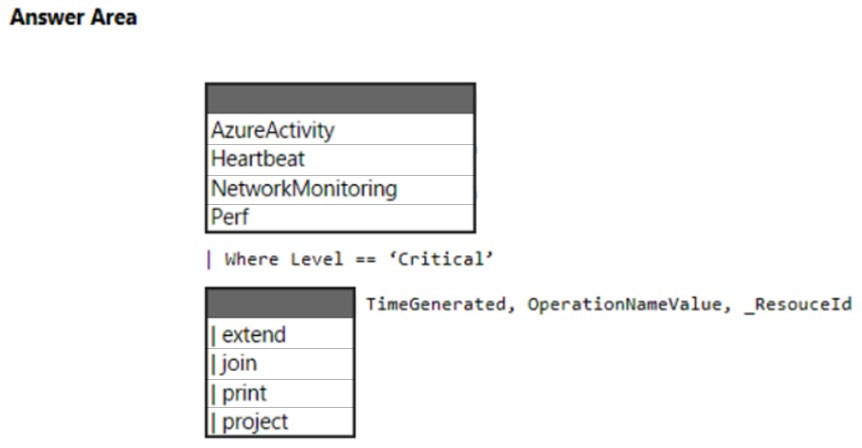
Correct Answer: 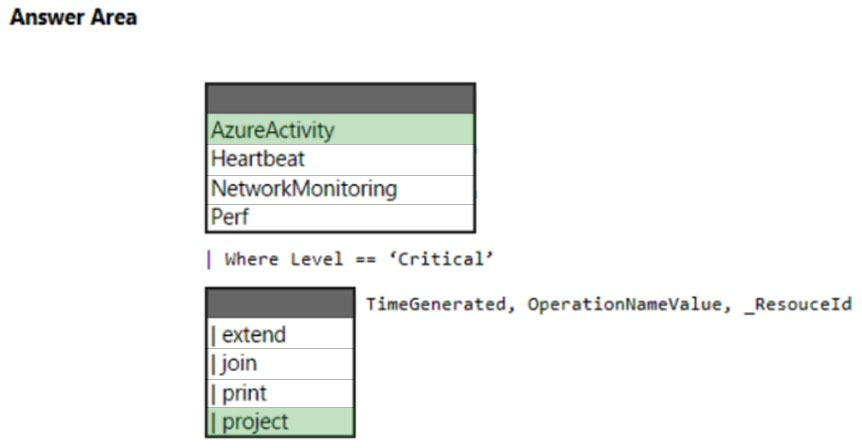
Box 1: AzureActivity –
The AzureActivity table has entries from the Azure activity log, which provides insight into subscription-level or management group-level events occuring in Azure.
Let’s see only Critical entries during a specific week.
The where operator is common in the Kusto Query Language. where filters a table to rows that match specific criteria. The following example uses multiple commands. First, the query retrieves all records for the table. Then, it filters the data for only records that are in the time range. Finally, it filters those results for only records that have a Critical level.
AzureActivity –
| where TimeGenerated > datetime(10-01-2020) and TimeGenerated < datetime(10-07-2020)
| where Level == ‘Critical’
Incorrect:
not Perf: The Perf table has performance data that’s collected from virtual machines that run the Log Analytics agent.
Box 2: | project –
Select a subset of columns: project.
Use project to include only the columns you want. Building on the preceding example, let’s limit the output to certain columns:
AzureActivity –
| where TimeGenerated > datetime(10-01-2020) and TimeGenerated < datetime(10-07-2020)
| where Level == ‘Critical’
| project TimeGenerated, Level, OperationNameValue, ResourceGroup, _ResourceId
Reference:
https://github.com/MicrosoftDocs/dataexplorer-docs/blob/main/data-explorer/kusto/query/tutorial.md
Question #23Topic 6
You have a Recovery Services vault named RSV1. RSV1 has a backup policy that retains instant snapshots for five days and daily backup for 14 days.
RSV1 performs daily backups of VM1. VM1 hosts a static website that was updated eight days ago.
You need to recover VM1 to a point eight days ago. The solution must minimize downtime.
What should you do first?
- A. Deallocate VM1.
- B. Restore VM1 by using the Replace existing restore configuration option.
- C. Delete VM1.
- D. Restore VM1 by using the Create new restore configuration option.
Correct Answer: B
Replace existing:
You can restore a disk, and use it to replace a disk on the existing VM.
The current VM must exist. If it’s been deleted, this option can’t be used.
Azure Backup takes a snapshot of the existing VM before replacing the disk, and stores it in the staging location you specify. Existing disks connected to the VM are replaced with the selected restore point.
The snapshot is copied to the vault, and retained in accordance with the retention policy.
After the replace disk operation, the original disk is retained in the resource group. You can choose to manually delete the original disks if they aren’t needed.
Reference:
https://docs.microsoft.com/en-us/azure/backup/backup-azure-arm-restore-vms
Community vote distribution
D (54%)
B (46%)
